Tour Fleet & Vehicle Management Software – Tour Management Made Right
Fleet and Vehicle Management for Tour Operators
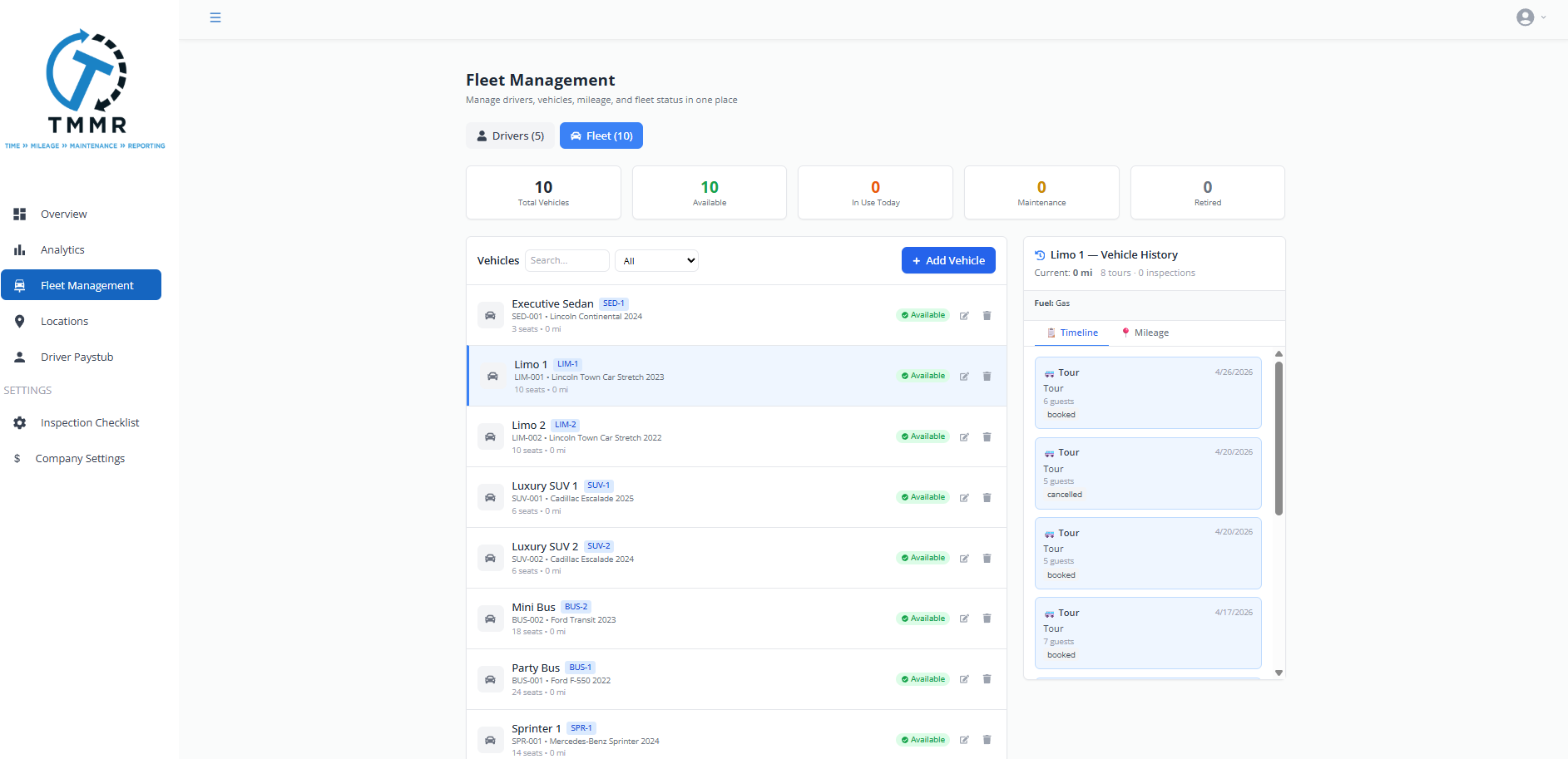
Fleet management software that tracks every vehicle in your fleet: maintenance schedules, inspection checklists, mileage logs, insurance and registration dates, and which driver is assigned to which vehicle today.
Vehicle Profiles
Each vehicle gets a profile with make, model, year, VIN, license plate, passenger capacity, and any special features (wheelchair lift, cooler, Bluetooth audio). Filter your fleet by capacity or feature when assigning vehicles to tours.
Upload photos so drivers and dispatch can identify the right vehicle at a glance.
Maintenance Schedules and Alerts
Set recurring maintenance intervals by mileage or date: oil changes, tire rotations, brake inspections, state safety inspections. Tour Management Made Right sends alerts before any service is due so you never miss a maintenance window.
Log completed services with date, mileage, cost, and vendor. Build a full service history per vehicle.

Pre-Trip Inspection Checklists
Drivers complete a digital pre-trip inspection before every tour. Tire condition, fluid levels, cleanliness, safety equipment. If an item fails, the inspection flags the vehicle and notifies dispatch before the driver leaves the lot.
Inspection records are stored per vehicle and per driver for compliance and liability documentation.

Mileage Tracking and Driver Assignment
Mileage logs automatically from GPS tracking during tours. See total mileage per vehicle, per driver, or per time period. Assign specific vehicles to specific drivers or let dispatch choose at tour time.
Insurance and registration expiration dates trigger alerts so nothing lapses while a vehicle is in active rotation.

Manage Your Fleet in 3 Steps
Add Your Vehicles
Create a profile for each vehicle with specs, capacity, photos, and document uploads (insurance, registration).
Set Maintenance Rules
Define maintenance intervals by mileage or calendar date. Tour Management Made Right tracks usage and sends alerts when service is due.
Assign and Inspect
Assign vehicles to tours. Drivers complete pre-trip inspections on their phone before leaving the lot.
Fleet Management Software for Wine Tour Operations
Wine tour fleets deal with specific vehicle requirements that generic fleet tools ignore. Some wineries restrict vehicles over a certain length. Group size determines whether you send a sedan, SUV, or 14-passenger van. Vehicles need coolers for wine purchases and clean interiors for a premium guest experience. Tour Management Made Right tracks all of it per vehicle profile.
Tour Management Made Right vs. Spreadsheets and Whiteboards
| Capability | Spreadsheets / Manual | Tour Management Made Right |
|---|---|---|
| Vehicle profiles | Rows in a spreadsheet | Full profiles with photos |
| Maintenance alerts | Calendar reminders | Mileage + date triggers |
| Pre-trip inspections | Paper forms | Digital on mobile app |
| Mileage tracking | Manual odometer logs | Auto-logged from GPS |
| Insurance/registration tracking | File cabinet | Expiration alerts |
| Vehicle-driver assignment | Whiteboard | Linked to scheduling |
Frequently Asked Questions
How many vehicles can I track in Tour Management Made Right?
Both the Enthusiast and Sommelier plans support unlimited vehicles. There is no per-vehicle fee. You only pay the base plan plus $10/driver.
Can drivers complete inspections on their phone?
Yes. Pre-trip and post-trip inspection checklists are completed through the Tour Management Made Right mobile app. Photos can be attached to any checklist item.
Does Tour Management Made Right track mileage automatically?
Yes. Mileage is logged from GPS data during active tours. You can also enter manual odometer readings if needed.
Can I set different maintenance schedules per vehicle?
Yes. Each vehicle has its own maintenance schedule based on mileage intervals, calendar dates, or both.
Does the system alert me before insurance expires?
Yes. Upload insurance and registration documents with expiration dates. Tour Management Made Right sends alerts before they lapse.
Can I filter vehicles by passenger capacity?
Yes. Filter by capacity, vehicle type, features, or availability when assigning a vehicle to a tour.
Does fleet management connect to scheduling?
Yes. Vehicle assignments are linked to Driver Scheduling. When you assign a driver to a tour, you assign the vehicle at the same time.