Tour Invoicing & Payment Software – Tour Management Made Right
Invoicing and Payments for Tour Operators
Tour invoicing software that stops the payment chase. Tour Management Made Right generates invoices directly from completed bookings, tracks deposits and balances, sends payment reminders, and connects to your accounting workflow.
Invoice Generation from Bookings
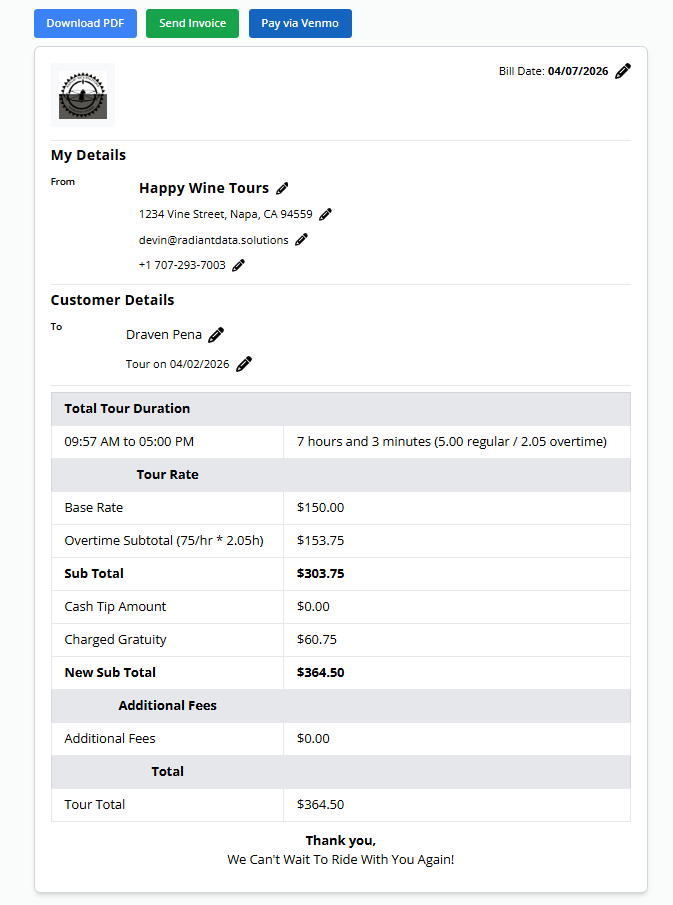
Complete a tour, generate an invoice. Tour Management Made Right pulls the client info, tour details, pricing, and line items directly from the booking record. No re-typing, no copy-paste errors.
Customize invoice templates with your logo, payment terms, and notes. Send invoices by email directly from Tour Management Made Right.
Payment Tracking and Deposit Management
Track the full payment lifecycle: deposit received, balance due, paid in full. Record partial payments, apply deposits against final invoices, and see outstanding balances at a glance.
Know exactly how much revenue is booked, how much is collected, and what’s still outstanding across your entire operation.

Payment Reminders and Follow-Ups
Set reminders for upcoming payment due dates and overdue balances. Tour Management Made Right flags unpaid invoices so you can follow up before accounts go stale.
Automate reminder emails for clients who haven’t paid by the due date. Less time chasing checks, more time running tours.

Accounting Sync and Export
Export invoices and payment data in formats your accountant or bookkeeper can use. Tour Management Made Right supports CSV export and integrations with common accounting tools through the Integrations module.
Keep your books clean without duplicate data entry between your tour platform and your accounting system.

From Completed Tour to Paid Invoice in 3 Steps
Generate the Invoice
When a tour is marked Done, generate an invoice from the booking. Client info, pricing, and line items populate automatically.
Send and Track
Email the invoice to the client. Tour Management Made Right tracks when it was sent, when it’s due, and whether a deposit has been applied.
Record Payment
Log payments as they come in. The invoice status updates to reflect partial or full payment. Export to accounting when ready.
Tour Invoicing Software for Wine Tour Operations
Wine tour billing has its own quirks: group deposits weeks before the tour, gratuity line items, split invoices for corporate events, and seasonal pricing adjustments for peak harvest months. Tour Management Made Right handles these patterns natively so you’re not forcing tour-specific billing into a generic invoicing tool.
Tour Management Made Right vs. Spreadsheets and Generic Tools
| Capability | Manual Process | Tour Management Made Right |
|---|---|---|
| Invoice generation | Retype from booking | One-click from booking |
| Deposit tracking | Separate spreadsheet | Built into payment flow |
| Payment reminders | Manual follow-ups | Automated alerts |
| Outstanding balance view | Manual tally | Real-time dashboard |
| Gratuity line items | Added by hand | Configurable line items |
| Accounting export | Manual re-entry | CSV and integrations |
Frequently Asked Questions
Can I generate an invoice directly from a booking?
Yes. When a booking is marked Done, you can generate an invoice with one click. Client info, tour details, and pricing are pulled from the booking automatically.
Does Tour Management Made Right handle deposits and partial payments?
Yes. You can record deposits at booking time and apply them against the final invoice. Partial payments are tracked with a running balance.
Can I add gratuity as a line item?
Yes. Invoices support custom line items including gratuity, service fees, and any other charges specific to your operation.
Does Tour Management Made Right send payment reminders?
Yes. You can set automatic reminders for upcoming due dates and overdue invoices. Clients receive email notifications without you chasing them manually.
Can I export invoice data for my accountant?
Yes. Tour Management Made Right supports CSV export of invoices and payment records. You can also connect to accounting tools through the Integrations module.
Can I customize invoice templates?
Yes. Add your logo, company info, payment terms, and notes to your invoice template. Every invoice you generate uses your branding.
How does split billing work for group tours?
You can create multiple invoices for a single booking. Useful for corporate events where different departments cover different portions of the total.