Tour Booking Management Software – Tour Management Made Right
Tour Booking Management Software for Operators
Tour booking software with a clear pipeline from first inquiry through tour completion, so nothing slips through the cracks. Create tours, capture client details, assign drivers and vehicles, and track every booking’s status in real time.
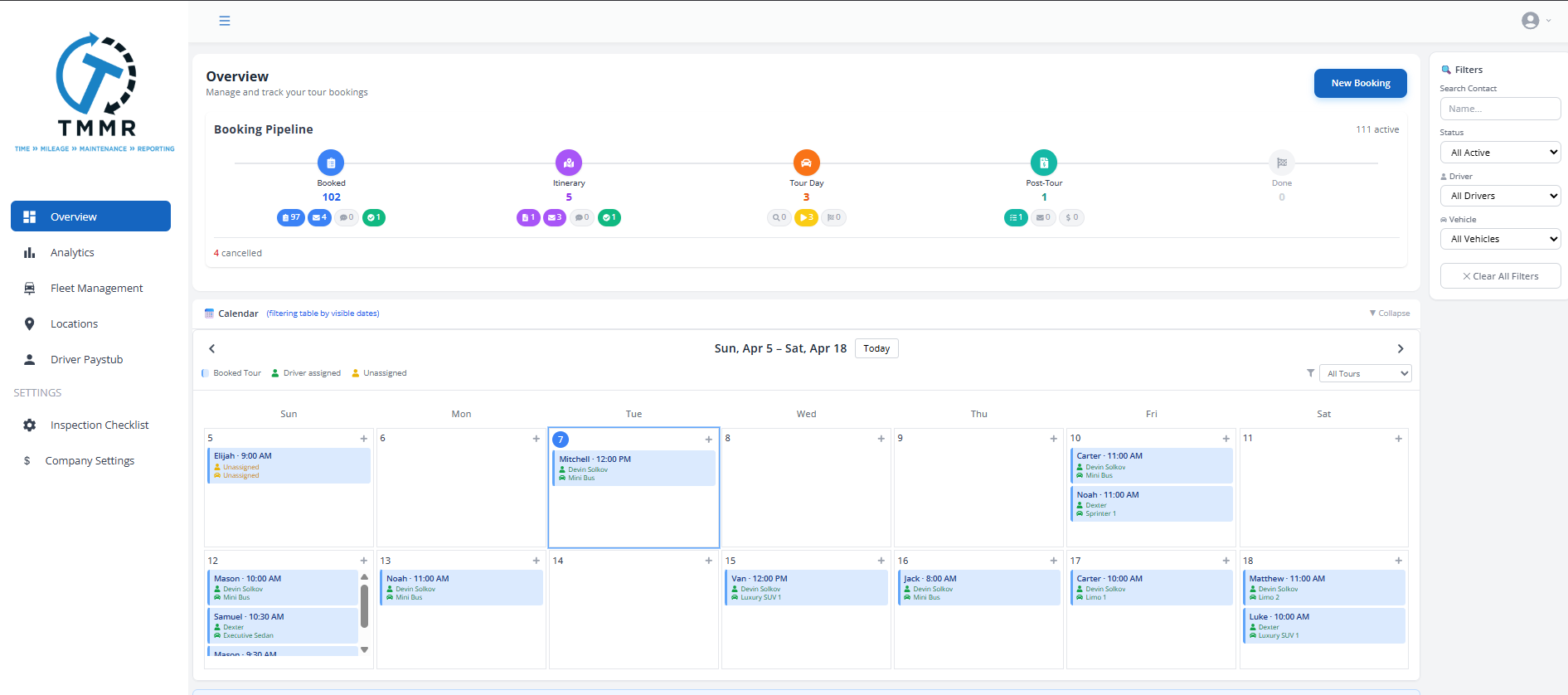
Visual Booking Pipeline
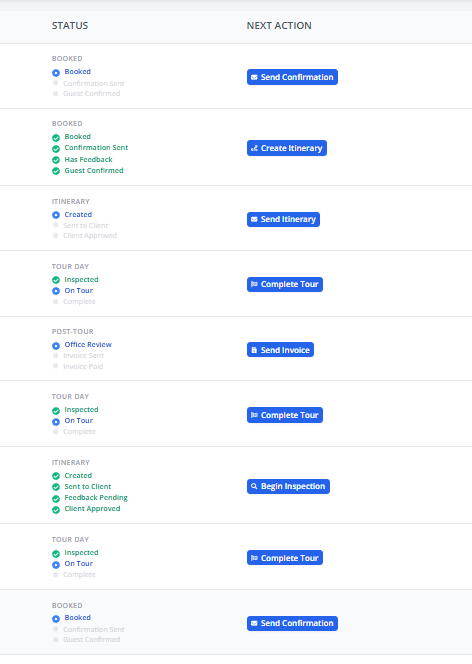
See every booking move through a clear status flow: Booked, Confirmed, Inspected, Active, and Done. Each status is visible at a glance so you know exactly where every tour stands.
Filter your pipeline by date range, driver, vehicle, or client to focus on the bookings that need attention right now.
Tour Creation and Client Capture
Build a tour in seconds: select a date, choose a route or itinerary, attach the client, and add guest details. Tour Management Made Right pulls existing client info automatically so you don’t re-enter the same data for repeat customers.
Attach notes, special requests, and dietary preferences directly to the booking for your drivers to see.
Driver and Vehicle Assignment
Assign a driver and vehicle to each booking based on availability, qualifications, and vehicle capacity. Tour Management Made Right shows who’s open and which vehicles are free for any given date.
Reassign on the fly if plans change. Drivers get notified instantly through the mobile app.

Status Tracking and Tour History
Every booking carries a full audit trail: when it was created, who confirmed it, when the vehicle was inspected, and when the tour was marked complete. Nothing gets lost.
Use booking history for reporting, client follow-ups, and identifying your busiest days and routes.

From Inquiry to Completed Tour in 3 Steps
Create the Booking
Enter tour details, select the client, choose a route, and set the date. Tour Management Made Right creates the booking and sets its status to Booked.
Assign and Confirm
Assign an available driver and vehicle. Confirm the booking with the client. Status moves to Confirmed automatically.
Track Through Completion
The driver runs the tour. Status updates flow through Inspected, Active, and Done as each stage completes.
Tour Booking Software Built for Wine Tour Operators
Wine country bookings aren’t simple A-to-B trips. They involve multi-winery coordination, reservation-dependent scheduling, and last-minute changes when a tasting room hits capacity. Tour Management Made Right lets you manage the full booking lifecycle with the flexibility that wine tour operations demand.
Tour Management Made Right vs. Spreadsheets and Generic Tools
| Capability | Manual Process | Tour Management Made Right |
|---|---|---|
| Booking pipeline visibility | Email threads | Visual status board |
| Driver/vehicle assignment | Phone calls | One-click assignment |
| Client info reuse | Re-type every time | Auto-populated |
| Status tracking | Sticky notes | Real-time pipeline |
| Tour history | Buried in email | Full audit trail |
| Scheduling conflicts | Double-bookings | Availability checks |
Frequently Asked Questions
How does the booking pipeline work?
Every booking moves through five statuses: Booked, Confirmed, Inspected, Active, and Done. You can see all bookings in a pipeline view and filter by status, date, driver, or client.
Can I assign a driver and vehicle at booking time?
Yes. When you create a booking, Tour Management Made Right shows available drivers and vehicles for that date. You can assign immediately or come back later to finalize the assignment.
Does Tour Management Made Right prevent double-booking drivers?
Yes. The assignment screen flags scheduling conflicts so you can’t accidentally assign a driver who’s already committed to another tour at the same time.
Can I attach notes and special requests to a booking?
Yes. Each booking has a notes field and a special requests section. Drivers see this information in the mobile app before the tour starts.
Does Tour Management Made Right connect bookings to invoicing?
Yes. Completed bookings can generate invoices automatically through Invoicing & Payments. Tour details, client info, and pricing carry over so you don’t re-enter anything.
Can I see a history of all past bookings?
Yes. Every booking is stored with a full audit trail including creation date, status changes, driver assignments, and client communications.
How many bookings can I manage per month?
There is no booking limit on any plan. Whether you run 10 tours a month or 300, Tour Management Made Right handles it without per-booking fees.